Auto-Rules: How Smart Shortcuts Transform Your Child's Communication Journey
Published on August 14, 2025
Auto-Rules: How Smart Shortcuts Transform Your Child's Communication Journey
Your Child's Communication, Supercharged
For families navigating the world of AAC (Augmentative and Alternative Communication), every improvement in communication speed and ease makes a profound difference. QVoice – an AAC app designed specifically for young children with communication challenges – has just introduced a game-changing feature that parents and therapists are calling revolutionary: Auto-Rules.
Available across iOS, Android, and Web platforms, QVoice already helps thousands of children find their voice. Now, with Auto-Rules, imagine if your child's AAC device could anticipate their next word, automatically opening the right folder or speaking instantly when they need it most. That's exactly what this new feature does – it creates intelligent pathways that make communication faster, more intuitive, and ultimately more successful for young learners.
What Are Auto-Rules?
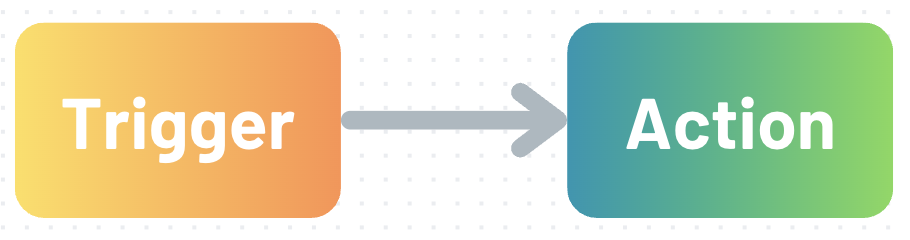
Auto-Rules are smart automations that work like helpful assistants in your child's communication device. They watch for specific actions (like pressing the "EAT" button) and automatically respond with helpful next steps (like opening the "FOODS" folder). Think of them as creating a personalized communication highway designed specifically for how your child thinks and communicates.
For children learning to use AAC, every tap counts. Auto-Rules reduce the number of steps needed to build sentences, making the difference between frustration and successful communication.
The Simple Magic: Triggers and Actions
Every Auto-Rule follows a beautifully simple formula that parents and therapists can easily understand and customize:
The Trigger (When This Happens...)
This is the starting point – what your child does that activates the Auto-Rule. You can set triggers for:
- Specific buttons: When your child presses "GO" or "EAT"
- Grammar categories: When they press any pronoun or action word
The Action (Then This Happens...)
This is the automatic response that helps your child communicate faster:
- Open a folder: Instantly navigate to related words
- Speak immediately: Have the device voice the word right away
Real-World Examples That Make a Difference
Let's look at how Auto-Rules transform everyday communication scenarios:
Mealtime Communication
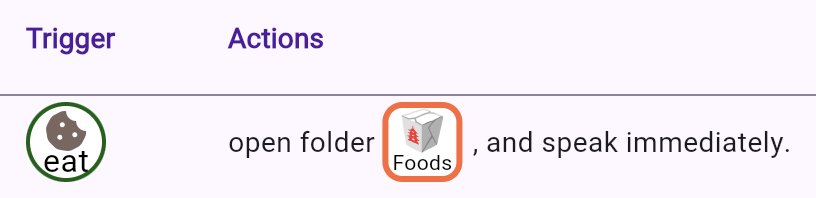
Auto-Rule: If "EAT" is pressed → Open "FOODS" folder and speak immediately
Result: Your child says "eat" and instantly sees all their food choices, ready to complete their request without navigating through multiple screens.
Going Places
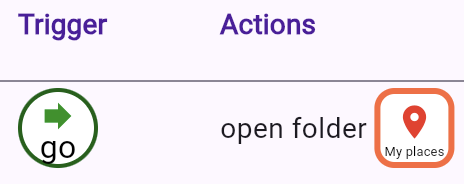
Auto-Rule: If "GO" is pressed → Open "MY PLACES" folder
Result: After expressing the desire to go somewhere, your child immediately sees their favorite locations (park, school, grandma's house) without searching.
Building Proper Sentences
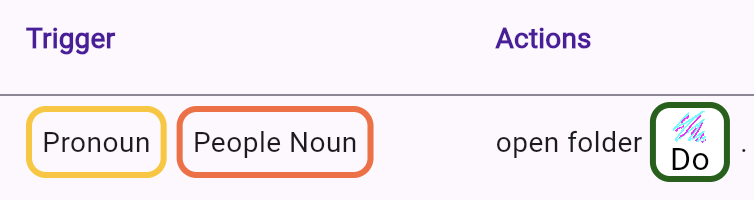
Auto-Rule: If any pronoun is pressed → Open "WANT" folder
Result: This naturally guides your child to build grammatically correct sentences like "I want..." or "She wants...", reinforcing proper language structure through repetition.
Why Auto-Rules Are Game-Changers for Young Learners
1. Faster Success, More Motivation
When children can communicate their needs quickly, they experience more successful interactions. This success breeds confidence and motivation to keep communicating. Instead of getting lost in navigation, they stay focused on their message.
2. Natural Language Learning
By creating pathways that model correct sentence structure, Auto-Rules help children internalize grammar patterns. When "I" consistently leads to action words, children naturally learn subject-verb relationships without explicit teaching.
3. Reduced Cognitive Load
Young children have limited working memory. Auto-Rules handle the navigation work, allowing children to focus their mental energy on choosing words and expressing thoughts rather than remembering where things are located.
4. Personalized to Your Child's World
Every child communicates differently. Some children always want to talk about vehicles after saying "go," while others might want to discuss people. Auto-Rules let you customize the communication flow to match your child's unique interests and patterns.
5. Maintaining Engagement During Therapy
Speech therapists report that Auto-Rules significantly improve session engagement. When children can communicate faster, they can practice more phrases in less time, making therapy sessions more productive and enjoyable.
Getting Started with Auto-Rules
Setting up Auto-Rules is refreshingly simple:
- Access the Q Menu: Long press the Q button in the top-left corner
- Navigate to Preferences: Tap to open settings
- Find Automations > Rules: See pre-filled Auto-Rules ready to enable
- Activate and Customize: Turn on suggested rules or create your own
Pro Tip: Start Simple
Begin with one or two Auto-Rules for your child's most frequent communication needs. As they become comfortable, gradually add more to build a comprehensive communication system.
Creating Your Own Auto-Rules
The best Auto-Rules are the ones tailored to your child's specific needs. Consider:
- Favorite topics: If your child loves trains, create a rule that opens transportation words after "like"
- Daily routines: Set up rules that match your family's schedule, like opening "breakfast foods" in the morning
- Therapy goals: Work with your SLP to create rules that support current language objectives
Important Considerations
To keep everything running smoothly:
- Each button can have only one Auto-Rule (preventing conflicts)
- Auto-Rules work with buttons as triggers (not gestures or other inputs)
- Rules are easily adjustable as your child's needs change
The Impact on Families
Parents using Auto-Rules report transformative changes:
"My daughter went from taking 30 seconds to ask for juice to doing it in under 5 seconds. The speed difference means she actually uses her device now instead of just pointing." – Sarah, mom of 4-year-old Emma
"The Auto-Rules helped my son understand sentence structure without me constantly prompting him. It's like having a communication coach built into the app." – Michael, dad of 5-year-old James
Looking Forward: Your Child's Communication Evolution
Auto-Rules aren't just about speed – they're about opening doors to richer, more complex communication. As children become faster and more confident communicators, they're more likely to:
- Initiate conversations
- Express preferences and opinions
- Share stories and experiences
- Build social connections
Start Your Auto-Rules Journey Today
Ready to supercharge your child's communication? If you're already using QVoice, simply navigate to the Q Menu > Preferences > Automations, and explore the Auto-Rules waiting to transform your child's AAC experience. Start with the pre-configured rules, then customize as you learn what works best for your family.
New to QVoice? Learn more about our AAC app designed for young children at qvoice.app, where you can download the app for iOS, Android, or use it directly on the web.
Remember, we're here to support you. Every Auto-Rule you create is a step toward more natural, fluid communication for your child. And if you have ideas for new automations or improvements, we'd love to hear from you – we personally read and respond to every message from our QVoice families.
AAC automation, communication shortcuts, language learning, speech therapy tools, personalized AAC